Skullcandy Jib True 2: Specs, Pairing Guide and Fixes

Skullcandy Jib True 2: Specs, Pairing Guide and Fixes
Skullcandy Jib True 2 are budget true wireless earbuds with a mic that focus on long battery life, IPX4 sweat resistance, and Tile tracking.
Originally published: December 2025 – Focus: budget TWS, mic quality, pairing, reset and real-world battery life.
Skullcandy Jib True 2 are compact true wireless earbuds aimed at budget buyers who want simple controls, decent calls and long battery life without spending a lot. In India, they usually sit around Rs 2,500 to Rs 3,300, while in the US and UK, they tend to hover in the value segment rather than premium.
This skullcandy jib true 2 review is written for students, commuters, office users and light gamers who want a clear explanation of sound, mic quality, pairing, reset steps and common fixes. By the end you will know whether skullcandy jib true 2 suits your day-to-day use, which devices it works best with, and when you should pick a wired alternative instead.
Skullcandy Jib True 2: TLDR Cheat Sheet
- Type: budget true wireless earbuds with mic
- Battery: up to around 32 to 33 hours combined in many retail listings, older docs say 22 hours total
- Bluetooth: 5.2 with about 10-meter range
- Water resistance: IPX4, fine for sweat and light rain
- Controls: physical buttons, volume and track control from buds
- Extras: Tile tracking, mono mode on either bud, stereo calling
- Best use cases: casual music, calls, podcasts, gym, daily commute
Unboxing and first-time setup for Skullcandy Jib True 2
- Open the box and remove the case, earbuds, cable and extra ear tips.
- Plug in the case and charge skullcandy jib true 2 fully the first time.
- Make sure there are no stickers or films on the earbud or case charging contacts.
- Place both earbuds in the case until the LEDs show they are charging.
- Open the lid, take both buds out, and they should enter pairing mode. Then, follow the pairing steps for your device below.
Skullcandy Jib True 2 specs
| Feature | Skullcandy Jib True 2 specs |
|---|---|
| Driver size | 6 mm dynamic drivers |
| Frequency response | 20 Hz to 20 kHz |
| Impedance | About 16 ohm |
| Bluetooth version | Bluetooth 5.2, range about 10 meters |
| Audio codecs | SBC (some regions AAC) |
| Battery life (buds) | About 6 to 8 hours per charge |
| Battery life (case) | About 16 to 24 hours extra |
| Total battery | About 22 to 33 hours combined |
| Charging port | Micro USB on the case |
| Charge time | About 1 hour buds, 1 to 1.5 hours case |
| Water resistance | IPX4 sweat and splash resistant |
| Mic and calling | Built in mics in both buds, stereo calling |
| Special features | Tile finding, mono mode, master switching |
| Supported devices | Android, iOS, Windows, macOS, tablets, TVs |
On paper these skullcandy jib true 2 specs are typical for budget true wireless earbuds in 2025, with the standout being the long claimed battery and built in Tile tracking which you do not see on many cheap TWS. For latest official details in your region, double check the product page on the Skullcandy site before buying.
Design, Fit And Build Quality
The skullcandy jib true 2 case is small and pocket friendly, with a pill shape that slides easily into jeans or a small pouch. It feels mostly plastic and lightweight, so it will not add much bulk to a backpack or handbag. The hinge is basic but functional, and the lid opens wide enough to grab the earbuds quickly.
The earbuds themselves use a rounded in ear design with short nozzles and silicone tips. Skullcandy includes multiple ear gel sizes so you can experiment to get a tight seal. With the right size, skullcandy jib true 2 usually sit snug without needing ear hooks, and moderate head movement or slow jogging should not throw them out.
For small ears, the shells may stick out a little, but they are still compact compared to many stem style buds. For larger ears, the fit is simple and secure. Because each bud is light, you can wear skullcandy jib true 2 for long calls or movie sessions without much pressure on the ear canal.
The IPX4 rating means these earbuds can handle sweat, splashes and light rain. That makes skullcandy jib true 2 fine for gym sessions, runs in drizzling weather and daily commuting, but they are not designed for swimming or shower use. Always dry them off before putting them back in the case.
Sound Quality: Music, Movies And Podcasts
Tuning and sound signature
Out of the box, skullcandy jib true 2 follow Skullcandy’s usual fun tuning, with boosted bass, slightly warm mids and relaxed treble. Sub bass has a gentle thump which works well for hip hop and EDM, while the mid bass lift adds body to Bollywood tracks and pop.
Vocals sit slightly behind the bass but still remain clear enough for day to day listening. Highs have some sparkle but roll off before they get too sharp, which is good if you are sensitive to treble. Detail is decent for the price, but do not expect studio level resolution.
Music genres and volume
For casual listeners, skullcandy jib true 2 are enjoyable with Bollywood, Punjabi tracks, K pop, EDM, pop and YouTube music. Rock and metal can sound a bit congested at very high volume because the boosted bass can blur fast drum hits, so keeping the volume at 60 to 70 percent is ideal.
For movies and OTT, the bass helps explosions and soundtracks feel fuller, while dialogues stay understandable. Podcasts and audiobooks sound warm and smooth, which many people prefer for long listening sessions.
Noise isolation
There is no active noise cancelling, but passive isolation is decent if you get a tight fit. Skullcandy jib true 2 can cut a fair amount of bus rumble and fan noise, but loud metro rides and honking traffic will still bleed through. For office, home and classroom use, they block enough background sound to focus on calls and content.
- Use the largest ear tip that still feels comfortable for better isolation.
- Keep volume around 60 to 70 percent to avoid distortion and protect your hearing.
- If your phone has EQ, a slight reduction in bass and small boost in upper mids can make skullcandy jib true 2 sound clearer for vocals.
Microphone, Calls And Online Meetings
Mic quality on skullcandy jib true 2 is good enough for regular voice calls, WhatsApp audio and Zoom meetings, especially in quieter rooms. Your voice comes through slightly warm and not too thin, and stereo calling means you hear the other side in both ears.
In moderate background noise like a fan or low traffic, skullcandy jib true 2 still keep your voice understandable, though some background sounds will be audible. In very noisy streets or near construction, the mics struggle, which is normal at this price. Wind noise can also be an issue outdoors, so try to turn slightly away from strong gusts.
For online classes and work from home, skullcandy jib true 2 do the job if you are not in a very loud space. They work with Zoom, Google Meet, Microsoft Teams and Discord just like any other Bluetooth headset, as long as you select them in audio settings.
If you need absolutely rock solid call quality with zero latency and minimal background noise, a wired pair from your best wired earbuds with mic guide is still a smarter pick for serious support work, call centers or long professional meetings.
Gaming Latency And Video Lip Sync
In YouTube, Netflix, Hotstar and most OTT apps, skullcandy jib true 2 keep lip sync acceptable on modern phones and laptops. You might notice a tiny delay if you are very sensitive, but most people will find video watching smooth.
For games, casual titles like Subway Surfers or puzzle games feel fine. In shooters like BGMI, COD Mobile and PUBG, there is noticeable Bluetooth delay for gunshots and footsteps, which is common for budget TWS. It is playable for fun matches but not ideal for ranked or competitive esports.
To reduce delay when using skullcandy jib true 2 for gaming:
- Turn off power saver mode on your phone.
- Keep the phone or laptop close to you, not across the room.
- Close heavy background apps that may add processing delays.
For serious ranked matches or competitive play, a simple analog headset from your best wired earbuds list or an over ear option from your wired headphones 2025 guide will still beat skullcandy jib true 2 for zero lag and positional accuracy.
Battery Life, Charging And Everyday Use
Skullcandy’s official support pages mention up to 6 hours from the earbuds and 16 hours from the case for a total of 22 hours, while many 2025 retailer listings in India quote around 32 to 33 hours combined. In real life, with 60 to 70 percent volume, you can expect roughly 6 to 7 hours per charge and 2 to 3 full recharges from the case before you need to plug it in.
The case uses a micro USB port, not USB C, which feels dated but works fine if you still keep micro USB cables around. It usually takes about 1 to 1.5 hours to recharge the case fully and around 1 hour to top up the earbuds when they are drained.
LED indicators on the case give a rough idea of remaining battery. One flash means low, two flashes medium, three flashes high. On the earbuds, red LEDs show they are charging and turn off when charged.
In daily use, skullcandy jib true 2 fit well into a routine of commute plus gym plus some calls. For example:
- 1 hour commute + 1 hour music at work + 1 hour calls in a day.
- The earbuds still have charge left by evening, and the case can cover two or three such days before a recharge.
To extend the battery life of skullcandy jib true 2:
- Avoid storing them fully drained for long periods.
- Keep them away from high heat in parked cars or direct sun.
- Store the earbuds in the case when not in use so they do not slowly drain.
Controls Cheat Sheet: Taps, Volume And Voice Assistant
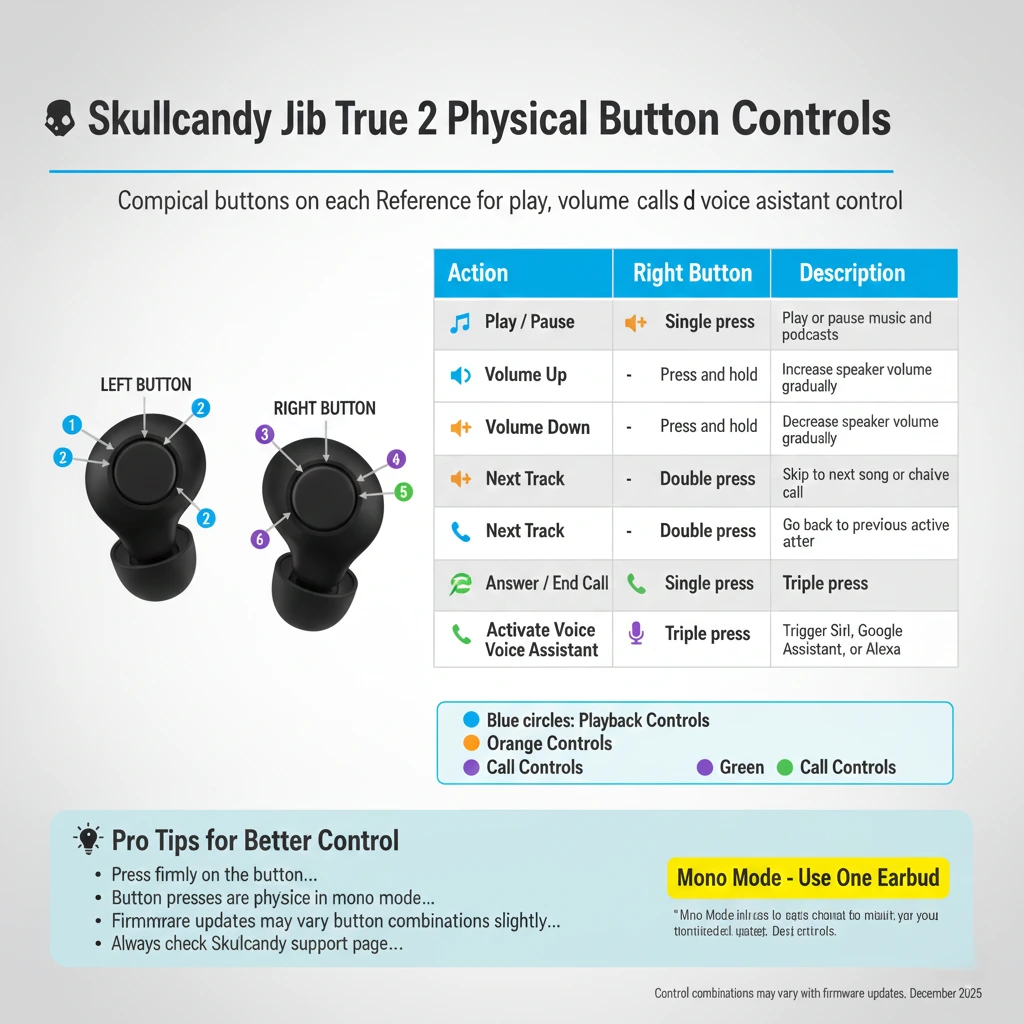
Skullcandy jib true 2 use physical buttons on each earbud rather than touch surfaces. That means fewer accidental taps but a bit of pressure on the ear when you click them.
| Action | Left earbud | Right earbud |
|---|---|---|
| Play / Pause | Single press | Single press |
| Volume up | – | Press and hold |
| Volume down | Press and hold | – |
| Next track | – | Double press |
| Previous track | Double press | – |
| Answer / end call | Single press | Single press |
| Voice assistant | Triple press | Triple press |
The exact combinations may vary slightly by firmware, so always check the latest user guide on the Skullcandy support site, but this table gives you a quick reminder. You can use either skullcandy jib true 2 earbud in mono mode, though you may lose some volume or track control depending on which side you keep in your ear.
How To Pair Skullcandy Jib True 2 (Step By Step)
Pairing skullcandy jib true 2 is simple once you follow the correct steps. Here are clear instructions for the most common devices. For diagrams and any firmware specific notes, you can also refer to the official pairing section on the Skullcandy help center.
If Skullcandy Jib True 2 do not enter pairing mode automatically, hold the buttons on both earbuds for about 4 seconds until one LED flashes red and blue – that means they are ready to pair.
Pairing Skullcandy Jib True 2 with Android phones
- Charge the case and earbuds at least partly.
- Take both skullcandy jib true 2 earbuds out of the case. They should power on and start flashing, then sync with each other.
- On your Android phone, open Settings, then Bluetooth.
- Turn Bluetooth on and wait for “Jib True 2” to appear in the available devices list.
- Tap “Jib True 2” and accept the pair prompt. After a few seconds, you should hear a “connected” voice prompt.
Pairing Skullcandy Jib True 2 with iPhone or iPad
- Open the case and remove both earbuds so skullcandy jib true 2 go into pairing mode.
- On your iPhone or iPad, open Settings and tap Bluetooth.
- Turn Bluetooth on and wait until “Jib True 2” shows under Other Devices.
- Tap it once to connect. When paired, skullcandy jib true 2 will move to the My Devices list and say “connected”.
Pairing Skullcandy Jib True 2 with Windows laptop or PC
- Remove both earbuds from the case so they power on and pair to each other.
- On Windows, open Settings, then Devices, then Bluetooth and other devices.
- Click “Add Bluetooth or other device” and choose Bluetooth.
- Select “Jib True 2” from the discovered devices and confirm pairing.
- Set skullcandy jib true 2 as the default input and output in Sound settings for calls and media.
Pairing Skullcandy Jib True 2 with MacBook
- Open the case and take out the earbuds.
- Click the Apple menu, open System Settings, then Bluetooth.
- Make sure Bluetooth is on. Wait for “Jib True 2” to appear in the list.
- Click “Connect”. Once connected, you can choose skullcandy jib true 2 in the sound input and output menus.
Pairing Skullcandy Jib True 2 with consoles and other devices
Skullcandy jib true 2 can connect directly to Nintendo Switch models that support Bluetooth audio, but not to PS4 or Xbox One without extra adapters. For TVs or older consoles, you will usually need a Bluetooth transmitter that plugs into the headphone jack or optical port.
Quick pairing fixes for Skullcandy Jib True 2:
- Toggle Bluetooth off and on again on your device.
- If pairing fails, “forget” Jib True 2 in Bluetooth settings and pair again.
- Make sure both earbuds have charge and are close to the phone or laptop.
How To Reset Skullcandy Jib True 2 And Fix Common Problems
If skullcandy jib true 2 stop pairing properly or one earbud does not work, a full reset often solves the issue.
Quick fixes checklist for Skullcandy Jib True 2 (try these first):
- Toggle Bluetooth off and on on your phone or laptop.
- Forget “Jib True 2” on your device, then pair again from scratch.
- Charge the case and buds for at least 30 minutes.
- Reset both earbuds using the 10 second hold method.
- Clean ear tips, meshes and charging contacts gently.
Factory reset and resync both earbuds
- On your phone or laptop, open Bluetooth settings and remove or forget “Jib True 2” from the paired devices list.
- Take both skullcandy jib true 2 earbuds out of the case.
- Power them off by holding the buttons on both buds for about 4 seconds until the LEDs turn off.
- Now hold the buttons on both earbuds for about 10 seconds. They will power on and then power off again, which completes the reset.
- Put both earbuds back in the case until you see red LEDs for charging, then take them out again.
- Wait while the LEDs flash and the earbuds sync. When only one earbud flashes red and blue, open Bluetooth on your device and pair “Jib True 2” like the first time.
One Skullcandy Jib True 2 earbud not working or very quiet
- Check that balance is not shifted to left or right in your phone’s audio settings.
- Remove the ear tip and gently clean the mesh with a dry brush or cloth.
- Try the factory reset and resync steps above to re pair both earbuds.
Skullcandy Jib True 2 not charging in the case
- Make sure any protective films or stickers on the charging contacts are removed.
- Check for dust or dirt on the metal pins in the case and on the earbuds and clean carefully.
- Confirm the buds sit fully in the slots and the lid closes properly.
- Try a different USB power adapter and micro USB cable to rule out a bad charger.
Skullcandy Jib True 2 will not connect or keeps disconnecting
- Keep the phone within 1 to 2 meters and avoid putting it in a thick bag or behind your body.
- Turn off Bluetooth on other nearby devices that might be trying to auto connect.
- Charge both the case and earbuds; low battery can cause random drops.
- Do a full reset and fresh pairing if the connection feels unstable.
For more troubleshooting details, Skullcandy also maintains model specific guides on the official support portal, which is worth checking if a problem keeps coming back.
Tile Tracking And Finding Lost Earbuds
One of the nice extras on skullcandy jib true 2 is built in Tile tracking. This lets you locate a missing earbud using the Tile app on your phone.
- Download the Tile app from the Google Play Store or Apple App Store, or visit the official Tile site for links.
- Create or sign in to your Tile account.
- Open the case, take out each skullcandy jib true 2 earbud and follow the app steps to add them as new Tiles.
- Once linked, you can make the earbuds ring from the app to help you find them nearby.
Keep in mind that Tile tracking needs the earbuds to have some battery left and be within Bluetooth range of your phone or another Tile community device. If skullcandy jib true 2 are fully drained or far away, the app will show their last known location but cannot update it until they reconnect.
Price, Availability And Warranty In India, US And UK
Pricing for skullcandy jib true 2 moves a lot with Amazon, Flipkart and Croma sales in India and similar events in the US and UK, so always check live deals before buying.
- India: usually around Rs 2,500 to Rs 3,300 online on Amazon India, Flipkart, Myntra, Reliance Digital and Croma, often discounted from a higher MRP.
- US: commonly in the budget range around 30 to 40 dollars at Amazon, Best Buy, Target and the official Skullcandy store.
- UK: often in the 30 to 40 pounds band at Amazon UK, Argos and other high street retailers.
Skullcandy typically offers a 1 year limited warranty on skullcandy jib true 2 in most regions. Keep your purchase invoice and check the official warranty terms on the Skullcandy warranty and support page for claim details in your country.
Because fake Skullcandy products do appear on third party marketplaces, try to buy skullcandy jib true 2 from authorised sellers or big retailers, check that the packaging looks clean and that product names and logos are printed correctly.
Skullcandy Jib True 2 Vs Alternatives
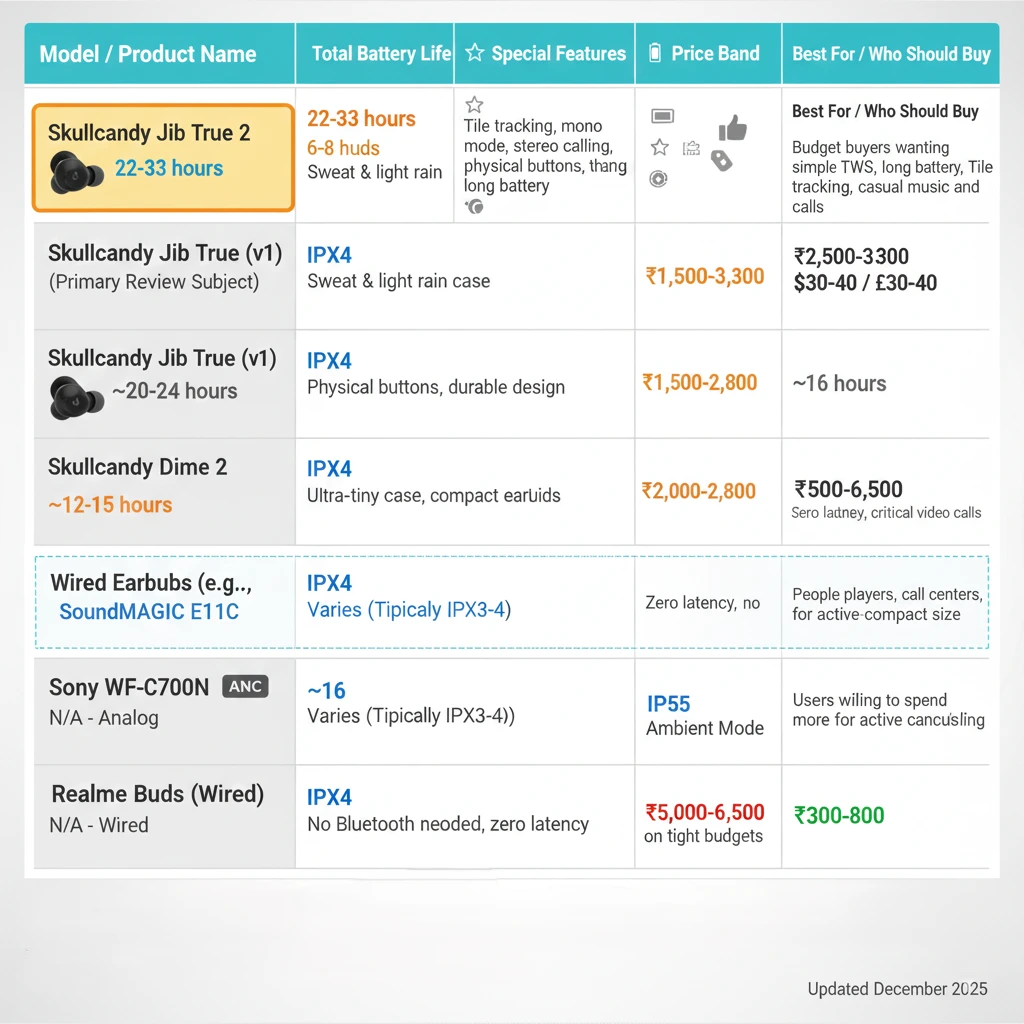
| Model | Total battery | IP rating | Special features | Who should buy |
|---|---|---|---|---|
| Skullcandy Jib True 2 | About 22 to 33 hours | IPX4 | Tile tracking, mono mode on either bud | Budget users who want a simple TWS with Tile and long life |
| Skullcandy Jib True (original) | Around mid 20 hour range | IPX4 | Older design, similar tuning, less battery | Only if you find it far cheaper than skullcandy jib true 2 |
| Skullcandy Dime 2 | Lower total than Jib True 2 | IPX4 | Very compact case, budget price | People who want an ultra-tiny case and do not mind a shorter battery |
| Wired earbuds with mic | No charging needed | Depends on the model | Analog connection, zero latency | Call centers, esports players, people who hate charging earbuds |
Compared to the original Jib True, skullcandy jib true 2 improve battery life in many retail versions, add Tile tracking and support using either earbud solo with master role switching. Against Skullcandy Dime 2, you trade a bulkier case for more battery and Tile support. If you only care about sound and call reliability and do not want to think about charging at all, wired choices from your other earbud and headset guides still make more sense.
Who Should Buy Skullcandy Jib True 2 (And Who Should Skip)
- Buy skullcandy jib true 2 if:
- You want budget true wireless earbuds for music, calls and workouts.
- You like a bass friendly tuning and are fine without ANC.
- You value IPX4 sweat protection and Tile finding to avoid losing buds.
- You want to use either earbud alone for calls and podcasts.
- Skip skullcandy jib true 2 if:
- You need active noise cancelling or very low gaming latency.
- You prefer USB C charging and advanced codecs or app EQ.
- You spend hours on critical work calls where wired gear is safer.
- You want premium build, wireless charging or multipoint pairing.
FAQ: Skullcandy Jib True 2
Is Skullcandy Jib True 2 waterproof or just water resistant?
Skullcandy jib true 2 are rated IPX4, which means they are water resistant, not fully waterproof. They can handle sweat and light rain, but you should not submerge them in water or use them in the shower.
How long does the battery of Skullcandy Jib True 2 last in real life?
In real life you can expect around 6 to 7 hours of playback from skullcandy jib true 2 at moderate volume, with 2 to 3 extra charges from the case. That puts total usable battery between the official 22 hour figure and the 32 to 33 hour claims in many 2025 listings, depending on how loud and how often you listen.
How do I pair Skullcandy Jib True 2 with a new phone?
To pair skullcandy jib true 2 with a new phone, remove both earbuds from the case, wait for one to flash red and blue, and then select “Jib True 2” in your phone’s Bluetooth menu. If they do not show, forget the earbuds on any old device, reset them using the 10 second button hold method and try pairing again.
Can I use only one Skullcandy Jib True 2 earbud at a time?
Yes, you can use either skullcandy jib true 2 earbud in mono mode. Once they are paired, just place one bud back into the case and keep the other in your ear. The remaining bud will handle both music and calls, although you may lose some volume or track controls depending on which side you are using.
How do I reset Skullcandy Jib True 2 if one side is not working?
If one skullcandy jib true 2 earbud is not working, remove “Jib True 2” from your device’s Bluetooth list, power off both buds, then hold the buttons for about 10 seconds to reset them. Put them back in the case until they show red LEDs, take them out again, wait for them to sync, and then pair like brand new.
Does Skullcandy Jib True 2 support fast charging?
Skullcandy jib true 2 use a micro USB port and do not support modern fast charge standards like some phones. However, the small battery means the earbuds charge to full in about an hour and the case in around 1 to 1.5 hours, which is quick enough for most users.
Are Skullcandy Jib True 2 good for gaming?
Skullcandy jib true 2 are fine for casual gaming and single player titles, but like most budget Bluetooth earbuds they have noticeable delay in competitive shooters. For ranked matches or esports, a wired headset from your best wired earbuds or wired headphones 2025 guides will still give you lower latency and clearer positional cues.
Do Skullcandy Jib True 2 work with both iPhone and Android?
Yes, skullcandy jib true 2 work with both iPhone and Android as long as the device supports Bluetooth audio. Just follow the standard pairing steps and select “Jib True 2” in the Bluetooth settings on your phone or tablet.
What is the warranty on Skullcandy Jib True 2 in India?
In India, skullcandy jib true 2 usually come with a 1 year limited warranty against manufacturing defects. To claim, you will need your invoice and may have to contact either the retailer or Skullcandy’s service partner as described on the official warranty section of the Skullcandy support site.
How do I clean Skullcandy Jib True 2 safely?
To clean skullcandy jib true 2, remove the ear tips and wipe them with a slightly damp cloth, then dry fully. Use a soft dry brush or cotton swab to remove earwax from the mesh without pushing it inside, and avoid using alcohol or sharp tools on the drivers or charging contacts.
Are Skullcandy Jib True 2 good for running and workouts?
Thanks to their light weight, secure in ear fit and IPX4 sweat resistance, skullcandy jib true 2 are well suited for gym sessions and running. Just make sure you use the right ear tip size and wipe them dry before placing them back in the case.
How does Skullcandy Jib True 2 compare to other earbuds under 3000?
Compared to many other earbuds under Rs 3,000, skullcandy jib true 2 stand out for Tile tracking, simple controls and their claimed long battery life. Competing models may offer USB C, ANC or app EQ instead, so your choice comes down to whether you prefer extra features or the combination of Tile and Skullcandy’s bass heavy sound.