How Long to Charge Earbuds: Charging Times and Safety
At-a-Glance Times (Quick Chart)
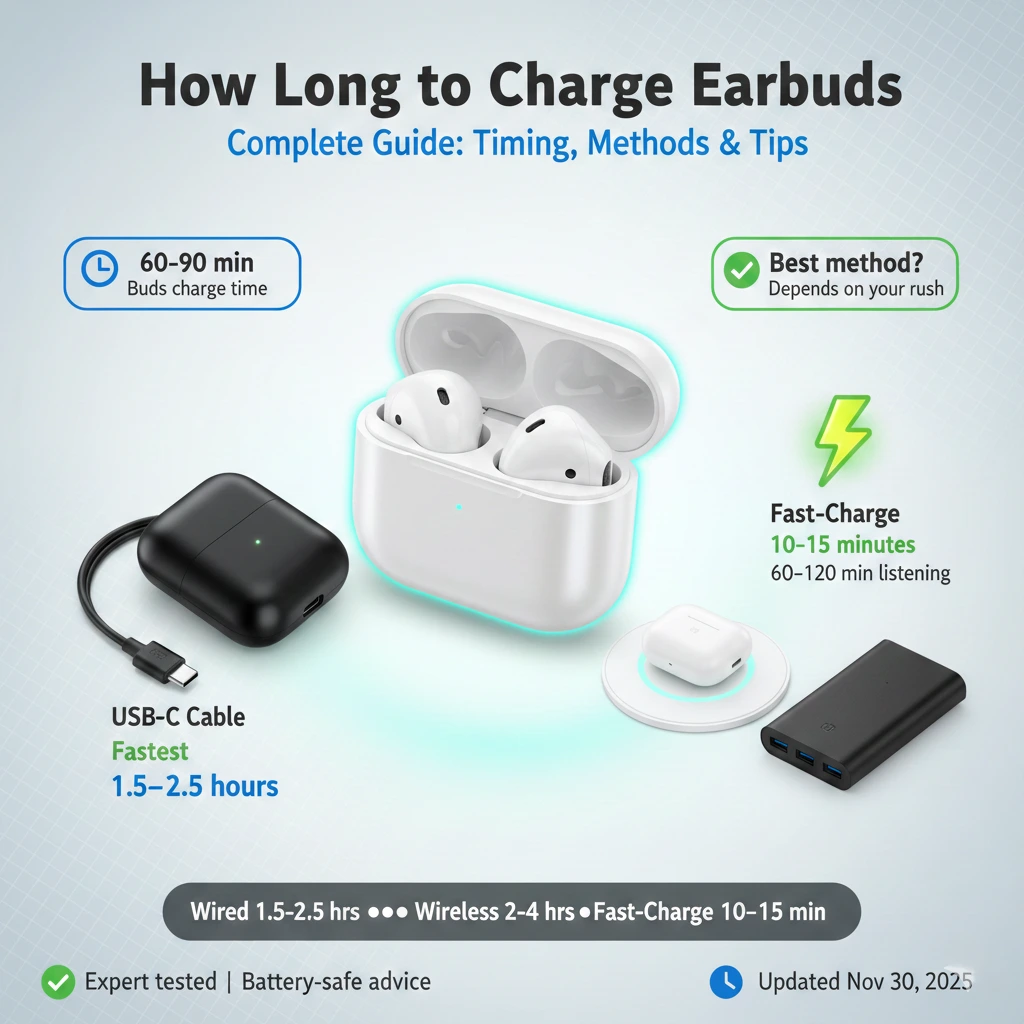
Use this table as a reality check. It’s based on common capacities (buds: 30–60 mAh each; case: 400–600 mAh), typical 5–10 W USB-C chargers, and normal room temperature. It’s the fastest way to sanity-check how long to charge earbuds for your setup.
| Scenario | Typical Time | What It Means |
|---|---|---|
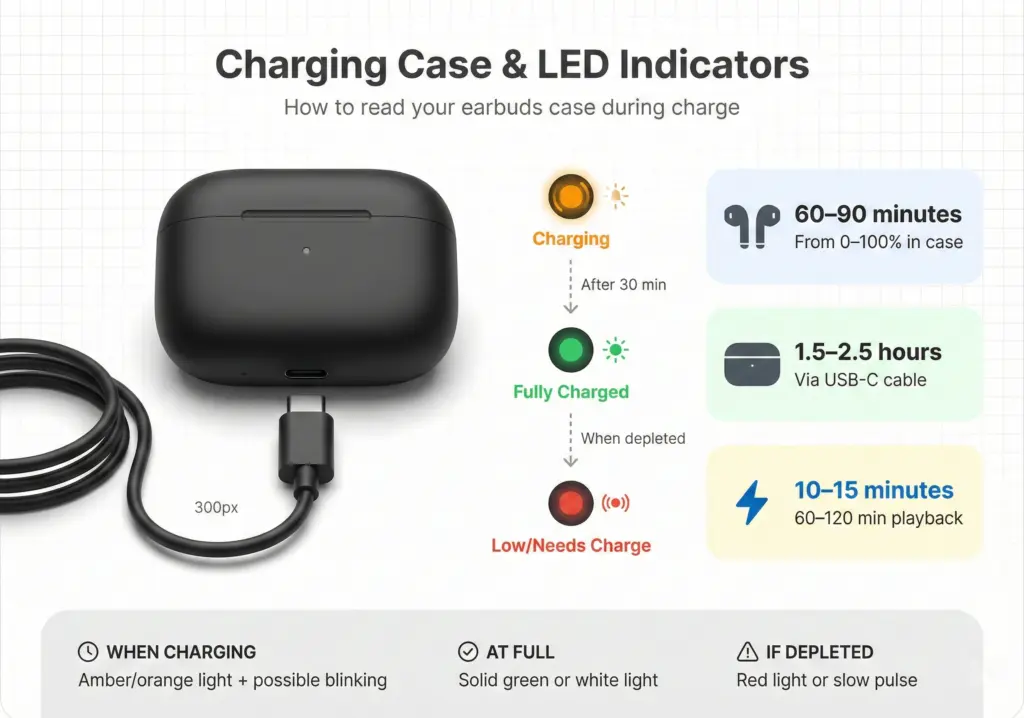
| Buds in case (0→100%) | 60–90 minutes | Assumes the case has enough juice to refill the buds. |
| Case via USB-C (0→100%) | 1.5–2.5 hours | 5–10 W input; trickle slows the top 10–20% to protect cells. |
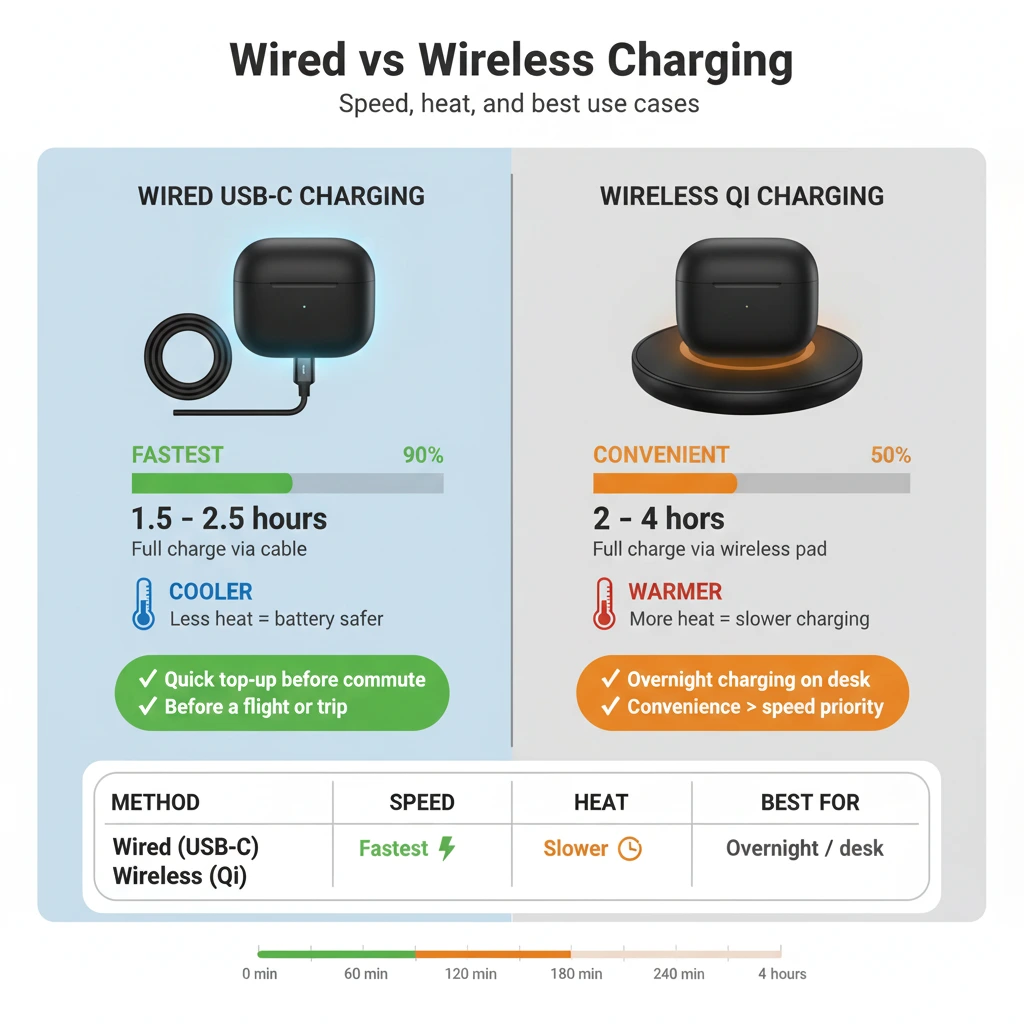
| Case on wireless pad | 2–4 hours | Qi is convenient but less efficient (warmer, slower). |
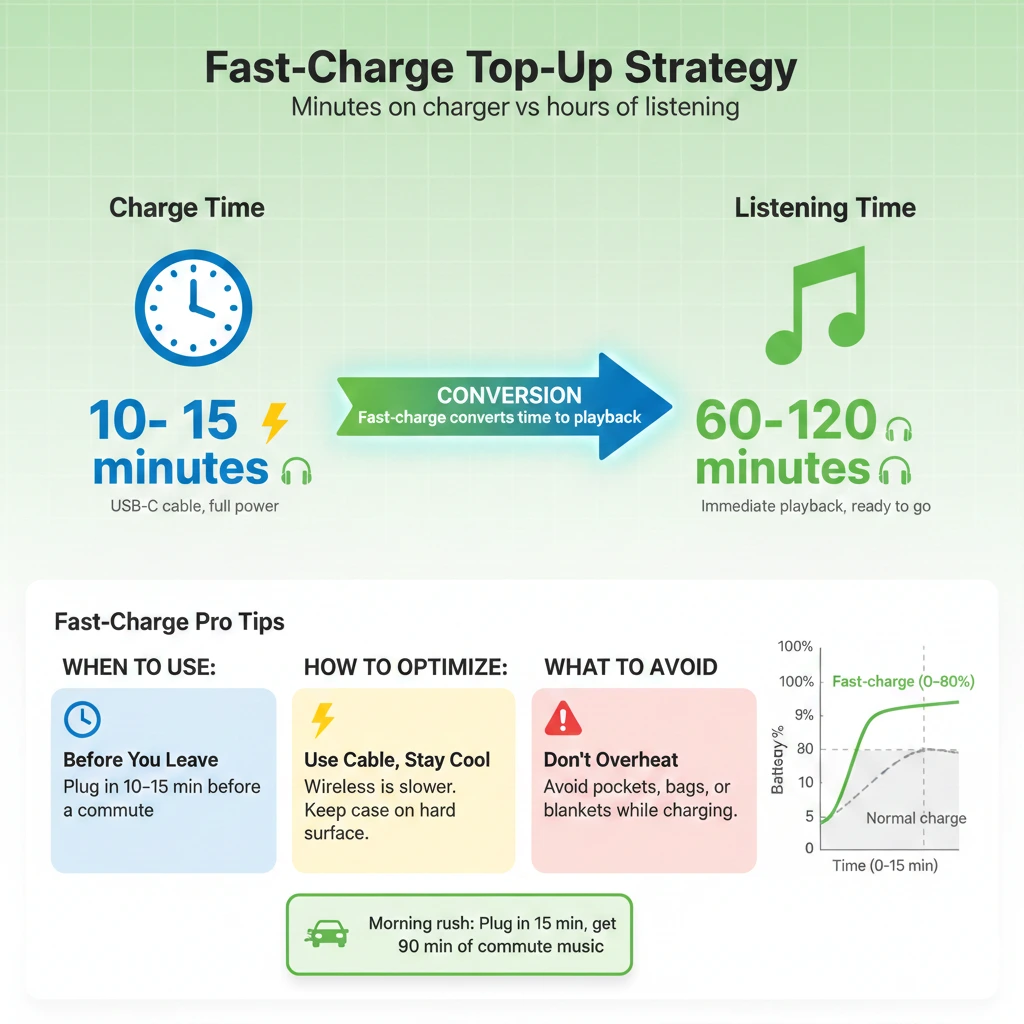
| Fast-charge top-up | 10–15 minutes | Usually adds 60–120 minutes of playback. |
| Cold or hot room | +20–50% time | Cells slow in cold and throttle in heat. |
What Affects How Long to Charge Earbuds
1) Battery size in buds and case
Small buds (≈30–35 mAh) fill faster than larger ANC buds (≈50–60 mAh). Bigger cases (≈500–600 mAh) store more energy but take longer to refill. Capacity is your first clue when estimating how long to charge earbuds and the case.
2) Charger power and cable quality
Earbud cases “sip” power—usually 5 W. A decent 5–10 W USB-C brick and a short, healthy cable keep speeds steady. Low-power laptop ports and frayed cables can add 20–30% to how long to charge earbuds and the case.
3) Temperature and airflow
Lithium-ion hates extremes. Cold slows the chemistry; heat triggers protective throttling. Don’t bury a charging case under blankets or in a tight bag. Good airflow often shaves minutes off how long to charge earbuds.
4) Wired vs wireless charging
Qi wireless is hands-free but less efficient. Expect an extra hour or more for the case on many setups. If you’re timing how long to charge earbuds before a commute, the cable wins.
5) Firmware and contact cleanliness
Dust on pogo pins or outdated firmware creates false “stuck at 99%” issues. A quick clean and update restores expected times and fixes confusing LED behavior.
For official brand basics, see Apple’s AirPods charging & battery life and Samsung’s Galaxy Buds battery & charging. If you need a USB-C refresher, the USB-IF maintains the official spec.
New to earbud care? Start with our primers: how to clean charging contacts and fast-charge explained.
Typical Ranges by Category
Brands tune charge curves differently, but most land inside these envelopes. Treat them as guidance when judging how long to charge earbuds without brand-specific figures.
| Category (Examples) | Buds 0→100% | Case via USB-C | Case via Wireless | Fast-Charge Claim (Typical) |
|---|---|---|---|---|
| Premium ANC (AirPods Pro, Galaxy Buds, Sony WF) | 70–90 min | 1.8–2.5 h | 2.5–4 h | 10–15 min → 1–2 h playback |
| Mid-range (Jabra, Soundcore, JBL) | 60–80 min | 1.5–2.2 h | 2.5–3.5 h | 10 min → 60–90 min |
| Budget (no ANC) | 50–70 min | 1.5–2 h | Often N/A | 5–10 min → 45–60 min |
Compact Brand Matrix (Conservative Windows — Verify in App)
These conservative windows reflect what most users will experience with a healthy cable and a typical 5–10 W USB-C charger at room temperature. Always verify in your brand app for the current device firmware and battery health.
| Brand | Buds 0→100% (min) | Case USB-C (hrs) | Case Wireless (hrs) | Fast-Charge (min → playback) | Verify in App / Widget |
|---|---|---|---|---|---|
| Apple (AirPods / Pro) | 60–80 | 1.5–2.0 | 2.0–3.5 | 5–10 → ~1–2 h | iOS Batteries widget; AirPods panel in Settings |
| Samsung (Galaxy Buds) | 60–80 | 1.5–2.0 | 2.5–3.5 | 10 → ~60–90 min | Galaxy Wearable app (Android) |
| Sony (WF series) | 70–90 | 2.0–2.5 | 3.0–4.0 | 10 → ~60 min | Sony Headphones Connect app |
| Jabra (Elite) | 60–80 | 1.5–2.0 | 2.5–3.5 | 10 → ~60–90 min | Jabra Sound+ app |
| OnePlus (Buds / Pro) | 60–80 | 1.5–2.0 | 2.0–3.0 | 10 → ~60–120 min | OnePlus Buds (OS) or HeyMelody |
| Nothing (Ear) | 60–80 | 1.5–2.0 | 2.5–3.5 | 10 → ~60–90 min | Nothing X app |
Note: Numbers above are intentionally conservative to avoid over-promising. If your results are slower, check cable quality, charger power, room temperature, and whether the buds were in a deep sleep or shipping mode (see below).
How to Tell They’re Fully Charged
Don’t guess—pair two signals to remove anxiety and keep how long to charge earbuds consistent day-to-day.
- Case LEDs: Amber/orange while topping up, green/white at full. Some blink during charge and turn solid at 100%.
- Phone widgets: iOS Batteries widget or Android Bluetooth tile shows per-bud and case percentage when connected or when you open the lid.
- Brand app: Many apps show fast-charge timers and which bud is still charging.
- Time one full run: Do a controlled 0→100% once with your usual charger/cable. Now you “know” how long to charge earbuds for your exact setup.
First Charge & Daily Routine
Out of the box
- Pair the buds, open the widget/app, and check levels.
- Top the case to 100% before a long day. It anchors how long to charge earbuds in your routine.
Daily habits that extend lifespan
- 20–80% rule: Avoid deep 0→100% swings daily. Partial top-ups are fine (often better).
- Case overnight, buds by day: Quick 10–15 minute bud top-ups cover most commutes.
- Monthly recalibration: Let the case run lower (not dead), then recharge to keep the indicator honest.
For Li-ion best practices, Battery University’s primer on charging lithium-ion is a good read. We also maintain an explainer on battery-health basics.
Fast-Charge: Smart Top-Ups
Fast-charge is designed to deliver the best “minutes of playback per minute on the charger.” To use it well:
- Prefer cable over wireless if you’re in a rush—it’s faster and cooler.
- Stick to 10–15 minutes for a targeted top-up before you leave.
- Open the app once after charging to confirm the jump and refine how long to charge the earbuds for your daily pattern.
- Keep it cool: If the case feels hot, move it to a hard surface with airflow.
Wired vs Wireless Charging (Qi)
Wireless pads follow the Qi standard. They’re convenient on a nightstand but slower and warmer than a cable. If you care about how long to charge earbuds, keep wireless for overnight top-ups and grab the USB-C cable when time matters.
| Method | Speed | Heat | Best Use |
|---|---|---|---|
| USB-C cable | Fastest | Cooler | Quick top-ups before you leave |
| Qi wireless pad | Slower | Warmer | Overnight or desk convenience |
Curious why wireless is slower? The Wireless Power Consortium explains Qi efficiency and alignment. Hunting for a pad? See our roundup of the best wireless chargers. Need power on the move? Compare the best power banks and USB-C chargers.
Power-Saving Nuggets: Travel/Shipping Mode & LEDs
Travel/Shipping mode affects charging time.
Many earbuds include a deep sleep or shipping mode (sometimes called travel mode) for safe storage and transport. If it’s still enabled after unboxing—or after a long time in a drawer—the buds may charge slower or not at all until they wake fully. Fix it by:
- Placing both buds in the case and closing the lid for 30–60 seconds, then reopening.
- Using the brand app to disable shipping/sleep mode or to run a quick reset.
- Doing a case button hold (varies by brand) to re-initialize contacts and wake the buds.
If you plan to store earbuds for weeks, enabling travel/shipping mode is smart—it reduces self-discharge. Just remember to wake them before timing how long to charge the earbuds.
LEDs and “always-on” indicators can waste power.
Case LEDs, “breathing” lights, and frequent lid-open checks consume the case battery. That can inflate your sense of how long to charge earbuds because the case keeps storing power between charges. Tips:
- Keep the lid closed; avoid repeated open-close checks.
- If your app lets you, dim/disable cosmetic LEDs or “Find device” beacons when you don’t need them.
- Don’t leave the case on a wireless pad all day—finish, then remove it.
Safety & Battery Health (Do’s & Don’ts)
- Do use a reputable 5–10 W USB-C charger and a decent cable.
- Do charge on a hard, ventilated surface—avoid fabric piles.
- Don’t leave the case on a wireless pad all day after full.
- Don’t store the case hot in a bag right after charging.
- Do clean pogo pins and bud contacts with a dry cotton swab.
- Do update firmware; many “charging issues” are software fixes.
Traveling with batteries? Check TSA guidance on batteries in carry-on and IATA’s lithium battery rules.
Troubleshooting Slow or Stuck Charging
If a pair suddenly takes much longer—or won’t charge at all—work through this checklist before you panic about how long to charge earbuds:
- Swap cable/charger: A weak brick or tired cable is the #1 culprit.
- Clean the contacts: Earwax and lint block the pogo pins—clean gently.
- Reseat the buds: Remove and reinsert; look for the charging icon in the app.
- Disable shipping/travel mode: Wake the buds as described above.
- Cool it down: If the case is warm, give it airflow and retry.
- Firmware update: Open the brand app and check for updates.
- Soft reset: Follow the brand’s reset steps, then re-pair.
- Battery age: After 18–24 months, capacity fades; consider service or replacement.
Brand specifics help too: Sony’s WF-1000XM5 charging indicators and Jabra’s true wireless charging steps are solid references. For a step-by-step internal walkthrough, see earbuds won’t charge — quick fixes.
On-the-Go & Travel Tips
- Carry a short USB-C cable and a compact 10 W wall adapter. This combo minimizes how long to charge earbuds between flights.
- Power banks: Even a 5,000 mAh pack can refill the case several times.
- Hotel ports: Many are low power; use your own adapter for predictable times.
- In-flight: Disable ANC when not needed to reduce top-up frequency.
FAQ: How Long to Charge Earbuds
How long to charge earbuds the first time?
Plan for 1.5–2.5 hours to fill the case by cable and ~60–90 minutes to top the buds. After that, partial top-ups are fine.
Is it bad to leave earbuds charging overnight?
Occasionally is fine. Long-term, unplug once full—especially on wireless pads—to reduce heat and time at 100%.
Does fast charging wear the battery faster?
A little, but within design limits, it’s safe. Balance quick top-ups with normal charges to maximize lifespan.
Why do my earbuds show 100% but the case is still charging?
The buds fill first; the case finishes afterward. If it feels unusually slow, check the cable, charger, and temperature.
How long to charge earbuds from a laptop USB port?
Often 20–40% slower than a wall adapter. If you’re in a hurry, use a dedicated charger.
Do bigger earbuds always take longer?
Usually, because larger ANC buds pack bigger cells. Efficient controllers can narrow the gap, but physics still applies.
Can I use my phone’s 30–65 W charger?
Yes. The case negotiates what it needs (typically 5 W). Extra wattage doesn’t force faster charging.
How long to charge earbuds if I only need one hour of playback?
A 10–15-minute fast-charge on a cable usually nets 60–120 minutes of listening.
Do I need to fully drain them sometimes?
No. Lithium-ion prefers partial cycles. A monthly deeper run can recalibrate the indicator—but avoid regular deep drains.
Why does the last 10% take so long?
Trickle charging protects the cell at a high state of charge. Don’t obsess over a perfect 100% before leaving.
Wrap-Up: 80/20 Rules
- Reality: Buds take ~60–90 minutes; cases ~1.5–2.5 hours by cable, longer on wireless.
- In a rush: 10–15 minute fast-charge on a cable is the sweet spot.
- Battery health: Keep it cool, avoid all-day charging on pads, and favor partial top-ups.
- Fixes: Cable swap, clean contacts, reseat buds, wake from shipping mode, update firmware—these solve most issues.
Time one full cycle for your own setup, and you’ll know exactly how long to charge earbuds for your routine—no guesswork, no waiting around.
Helpful Links & Sources
- Apple — AirPods charging & battery life
- Samsung — Galaxy Buds battery & charging
- Battery University — Charging Li-ion
- Wireless Power Consortium — Qi basics
- USB-IF — USB Type-C specifications
- Sony — WF-1000XM5 charging indicators
- Jabra — How to charge true wireless earbuds
- TSA — Batteries in carry-on
- IATA — Lithium battery guidance
Related guides
- Best Wired Earbuds (2025): List and Buying Guide
- Best Wired Earbuds With Mic 2025: Top Picks For Calls, Classes And Gaming
- 7 Best Wired Earbuds Under ₹1000 in India 2026: Ranked for Gaming and Calls
- Best Earbuds (2026): Top Wireless & Wired Picks + Buying Guide
- Wired Headphones 2025: Best Picks, Buying Guide And FAQs