Free Fire MAX Complete Guide (2026): Download, OB53 Update, Best Settings & India Server Tips
Free Fire MAX Complete Guide (2026): Download, OB53 Update, Best Settings and India Tips
Updated: 19 March 2026 | India Server (IST) | Covers: OB53 Advance Server, Best Settings, Lag Fix, Redeem Codes
Free Fire MAX is Garena’s premium battle royale for mobile with upgraded visuals and the same account as Free Fire via Firelink. Download it safely from Google Play or the App Store. The OB53 Advance Server is live now from 20 March to 2 April 2026.
If you play battle royale on mobile in India, Free Fire MAX is the best version of the game available to you right now. It runs on the same account as Free Fire using Firelink, so every skin, character, and diamond you have earned already carries over the moment you log in.
This guide answers every question Indian players search for in one place. It covers the safe download process for Android and iPhone, the full OB53 update breakdown with confirmed dates in IST, the best graphics and FPS settings for every phone tier from budget Redmi to flagship OnePlus, India-specific tips for Jio and Airtel users, a complete lag fix table, and where to get today’s active redeem codes.
If you are completely new to the game, start with our Free Fire beginner guide first, then come back here for the MAX setup. If you are already playing, jump straight to the settings section or the OB53 update details below.
What Is Free Fire MAX and How Is It Different from Free Fire?
Free Fire MAX is the enhanced edition of the Free Fire ecosystem. The gameplay is identical to the base game but the visuals are significantly upgraded: higher resolution textures, richer lighting, smoother particle effects during firefights, and more detailed character animations. On a capable phone, the difference is immediately visible.
For Indian players specifically, Free Fire MAX is the primary way to access the Free Fire ecosystem. The original Free Fire has availability restrictions in India, which makes FF MAX the go-to client for over 100 million Indian players.
The most important technical feature is Firelink. Firelink lets you sign in to Free Fire MAX using the same Google or Facebook account linked to your Free Fire profile. Your rank, characters, skins, diamonds, and progress sync instantly across both apps. You do not start over. You do not lose anything. You simply open Free Fire MAX, log in, and everything is there.
| Feature | Free Fire | Free Fire MAX |
|---|---|---|
| Visual quality | Standard graphics | Enhanced HD textures and effects |
| Account and progress | Shared via Firelink | Shared via Firelink |
| Storage required | Lighter install | Heavier, plan at least 4 to 6 GB free |
| Best suited for | Budget and very low-end phones | Mid-range to flagship phones |
| Availability in India | Restricted | Available on Play Store and App Store |
| Ranked mode | Same shared rank | Same shared rank via Firelink |
Free Fire MAX OB53 Update: Everything Confirmed So Far (April 2026)
Register at ff-advance.ff.garena.com with the Google or Facebook account linked to your Free Fire MAX profile. Activation codes are limited and distributed first-come first-served, so register immediately.
The full OB53 update is expected to go live in the first week of April 2026. Garena follows a consistent two-month update cycle: OB52 launched on 14 January 2026, placing OB53 squarely in early April. Maintenance on patch day typically runs from 9:30 AM to 5:00 PM IST.
OB53 is shaping up to be one of the biggest updates in recent history. It goes well beyond cosmetics. Here is every confirmed and strongly leaked feature broken down.
OB53 Key Dates at a Glance (IST)
| OB53 Milestone | Date (IST) | What to Do |
|---|---|---|
| Advance Server Opens | 20 March 2026 | Register at ff-advance.ff.garena.com to get your activation code |
| Advance Server Closes | 2 April 2026 | Advance Server progress does NOT carry to your main account |
| Full OB53 Patch Day | First week of April 2026 | Maintenance 9:30 AM to 5:00 PM IST. Free 2.5 GB storage before this |
| Gold Royale Reset | OB53 launch day | New Eclipse themed bundle arrives the moment the update goes live |
OB53 Gameplay Changes
The central theme of OB53 is Enhanced Combat Fluidity. These are the confirmed and strongly sourced gameplay changes coming to Free Fire MAX in April 2026.
- Weapon Balance Rework: The Marksman Rifle category is getting a significant overhaul. The Woodpecker receives a recoil stabilisation buff, making long-range precision far more consistent without needing heavy attachments.
- Bermuda Map Revamp: The Peak and Clock Tower sectors of Bermuda are receiving a visual upgrade with improved lighting, refined textures, and redesigned tactical cover positions for better close-range fights.
- New Mount: Horse: A rideable horse is being added to the game, giving players a new way to rotate quickly across the map without burning a vehicle slot.
- Bermuda Flood Global Event: A limited-time event that changes the map layout dynamically during a match, forcing teams to rotate or face rising water zones.
- Deployable Decoy Item: A new utility item that projects a hologram of your character to bait enemies and create openings during push situations.
- Improved Ranked Matchmaking: The ranked system is getting a fairness update to reduce skill-gap mismatches, which has been a top complaint on the India server.
- Smoother Movement and Gunplay: Under-the-hood engine improvements to animation blending and shot registration to make firefights feel more responsive.
OB53 New Characters and Cosmetics
Active skill that reveals enemy silhouettes through thin walls for a short duration. Strong for peeking and pre-aiming in close-range compound fights.
Grants a movement speed boost when HP drops below 25 percent. Pairs well with aggressive entry fraggers who push low on health.
The Free Fire x Gintama crossover is woven into OB53. Themed costume sets, weapon skins, and event modes are all part of the collab package.
A Galaxy and Eclipse themed Evo Bundle for both male and female characters with unique entrance animations and appearance transformation features.
Water-themed gun skins alongside new VSS and M82B skins. The Trogon gun skin ring event and an April Fool’s themed Faded Wheel event are also confirmed.
New bundles added. The Evo Vault is likely to feature combinations from Evo XM8, Evo Thomson, Evo SCAR 2.0, and Evo M10 2.0.
OB53 is expected to be one of the heaviest patches in recent history due to Gintama collaboration assets. Free up at least 2.5 GB before the maintenance window opens. Indian players on Jio or Airtel should download on 5GHz Wi-Fi rather than mobile data to avoid the resource pack stalling at a percentage.
How to Download Free Fire MAX Safely in India (Android and iPhone)
Unsafe Free Fire MAX downloads from APK mirror sites and Telegram groups are the top cause of account theft and device malware among Indian players. The correct answer is simple: use official stores only, always.
- APK mirror websites offering “mod” or “hack” versions
- Telegram channels sharing APK files claiming to be “latest version”
- WhatsApp groups with “direct download” links
- Sites misspelling Garena as “grena”, “gerena”, or “garina”
Download Free Fire MAX on Android via Google Play
- Open Google Play Store on your Android phone.
- Search for Free Fire MAX and open the official listing. Verify the developer reads Garena International I Private Limited.
- Tap Install and wait for the app download to complete.
- Once installed, open the game and allow it to download in-game resource packs. Do this on a stable Wi-Fi connection, not mobile data.
- Sign in using your Google or Facebook account linked to your existing Free Fire profile. Firelink will sync your progress automatically.
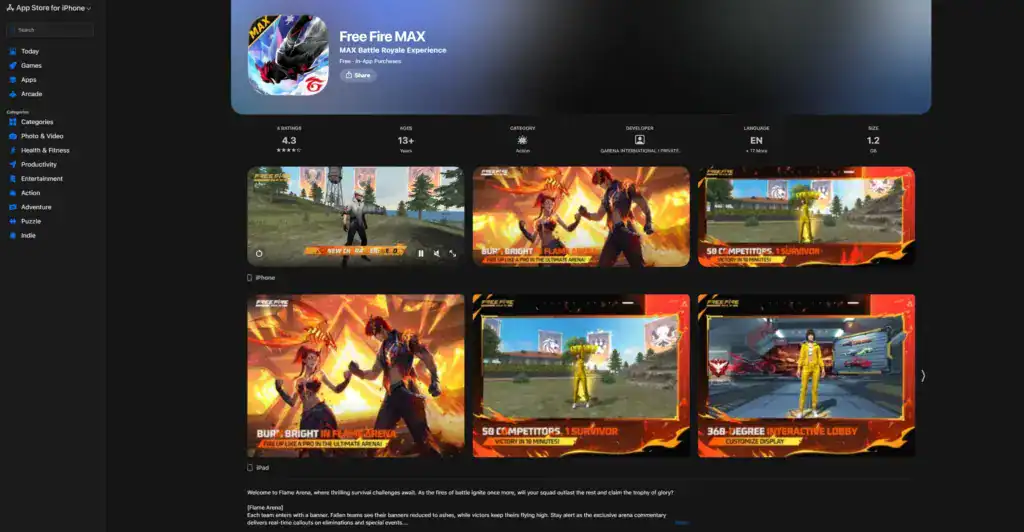
Download Free Fire MAX on iPhone via App Store
- Open the App Store on your iPhone.
- Search Free Fire MAX and confirm the publisher is Garena Online Private Limited.
- Tap Get and authenticate with Face ID or Touch ID.
- After installation, open the game and let the additional resource packs download fully on Wi-Fi before starting a match.
- Sign in with your Apple, Google, or Facebook account to activate Firelink and access your existing account.
Why the Game Downloads Twice (Resources Explained)
After installing Free Fire MAX from the store, the game downloads a second set of files called resource packs. These contain maps, textures, voice packs, and event content. This is standard for modern mobile games and keeps the store file size manageable by downloading content separately.
- Keep at least 4 to 6 GB of free storage before downloading or updating, especially on OB53 patch day.
- Use stable Wi-Fi for resource pack downloads. Jio 5G or Airtel fibre are ideal. Mobile data connections can stall mid-download.
- Keep the screen on and do not force-close the app during resource downloading. Closing mid-download restarts the process from a checkpoint and wastes time.
Free Fire MAX Best Settings for Smooth FPS (India Phone Tier Guide)
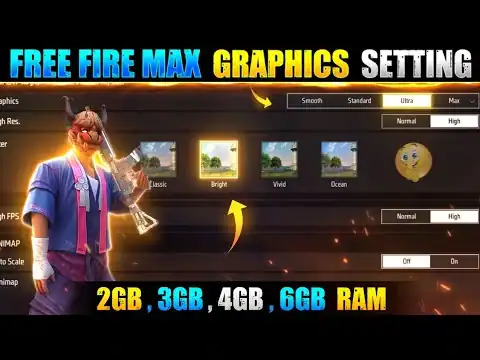
The biggest mistake Indian players make is copying settings from a YouTuber playing on a flagship phone while running a Redmi or Realme budget device. The best Free Fire MAX settings are not one universal preset. They depend entirely on your phone.
The single most important rule is this: stable FPS beats high graphics every time. A rock-solid 60 FPS on Smooth graphics will always outperform an unstable 90 FPS on HD when it comes to aiming, tracking enemies, and reacting in fights. Choose stability first, then increase graphics only if your phone handles it without heating.
Settings by Device Tier (India Price Brackets)
| Device Tier | Example Phones | Graphics | FPS Target | Turn Off |
|---|---|---|---|---|
| Budget (under Rs 10,000) | Redmi 9A, Realme C30, Samsung A05 | Smooth | High (if stable) | Shadows, bloom, extra effects, anti-aliasing |
| Mid-range (Rs 10,000 to Rs 25,000) | Redmi Note 13, Realme Narzo 70, Samsung M34 | Standard or Balanced | High | Extra effects if FPS dips below 50 |
| High-end (Rs 25,000 and above) | OnePlus 12R, iQOO Neo 9, Samsung S24 FE, iPhone 14 | HD then raise slowly | Highest stable | Reduce effects only if phone heats |
Graphics: Smooth | FPS: High | Shadows: OFF | Effects: Low | Anti-Aliasing: OFF | Background apps: fully closed | Do not play while charging
Free Fire MAX Sensitivity: How to Calibrate Properly
There is no single “best sensitivity” for Free Fire MAX. Every player’s grip, thumb size, and screen protector thickness affects what feels right. The goal is to find a sensitivity where you can track moving targets without over-flicking, not to copy a pro player’s numbers.
10-Minute Sensitivity Calibration Routine
- Enter the Training Room and do 10 short spray bursts at a wall target from close range.
- Adjust only one slider at a time, starting with General Look sensitivity.
- Test tracking: strafe left and right while keeping your crosshair centred on a target.
- Once it feels about 90 percent right, lock the settings and do not change them for at least 3 days of actual matches.
Ignore any video claiming a specific sensitivity gives “zero recoil”. Recoil control depends on pull-down technique and muscle memory, not on sensitivity numbers.
HUD Layout Tips for Indian Players
- Keep your fire button large and on the right side with plenty of dead space around it to avoid missing shots in fast fights.
- Place your gloo wall button in a position your thumb reaches without shifting grip. Gloo wall reaction time is often the difference between winning and losing a 1v1.
- Do not change your HUD layout every few days. Stick with one layout for at least a week before judging it. Muscle memory takes time to build.
- Use a 4-finger claw layout only if your phone screen is 6 inches or larger. On small budget screens, a well-optimised 2-finger layout gives better accuracy.
Free Fire MAX India-Specific Tips: Jio, Airtel, Budget Phones and the India Server
Playing Free Fire MAX on the India server comes with specific challenges that global guides never cover. Here are solutions to the most common problems Indian players face.
| Issue | India-Specific Cause | Best Fix for India |
|---|---|---|
| High ping on Jio 4G | VPN active, Jio’s traffic routing adds 30 to 80ms extra latency | Turn off VPN completely. Switch to Jio 5G SA band if your city has it live. |
| Lag spikes on Airtel broadband | Router congestion during 8 PM to 11 PM IST peak hours on 2.4GHz band | Connect to the 5GHz band on your Airtel router. It is far less congested in apartments and housing societies. |
| FPS drops on budget phones mid-match | Helio G85 and G88 chips throttle at 42 degrees Celsius. Thick phone cases trap heat. | Remove the case while playing. Do not play while charging. Use Smooth graphics at all times. |
| Region-locked redeem codes not working | India server accounts can only use India-tagged codes | Only use codes posted on the official Free Fire India social accounts. Global codes will show a region error. |
| Update stuck on Jio mobile data | Jio deprioritises gaming traffic during congestion | Switch to Wi-Fi for all major updates. If only mobile data is available, download during off-peak hours such as 1 AM to 7 AM IST. |
| Battery draining too fast during matches | Budget phones handle GPU and charging heat together poorly | Play unplugged. Reduce screen brightness to 60 percent. Close battery saver mode as it throttles the CPU. |
Your Free Fire MAX account is permanently tied to the India server from the moment of creation. A VPN cannot change your account region. It only changes your IP address. The game checks your Garena account region, not where your internet connection appears to be. India codes will not work on SEA or Global accounts and vice versa.
Free Fire MAX Lag Fix and Troubleshooting (Complete Table)
Use this table to diagnose your exact problem and apply the fix in order from top to bottom. Most Free Fire MAX issues on Android can be resolved within 5 minutes using this method.
| Problem | Most Likely Cause | Fix (apply in this order) |
|---|---|---|
| Game not opening or stuck on loading screen | Incomplete resource download, corrupted cache, very low storage | Restart phone. Free up 3 GB of storage. Reopen game. Let resources finish fully on stable Wi-Fi. |
| FPS drops and lag spikes mid-match | Graphics too high for the device, phone overheating, background apps consuming RAM | Lower graphics to Smooth. Disable battery saver mode. Close all background apps. Remove phone case. |
| High ping above 100ms | VPN running, 2.4GHz Wi-Fi congestion, weak signal | Turn off VPN. Switch to 5GHz Wi-Fi band. Avoid peak hours 8 PM to 11 PM. Restart router. |
| OB53 update not appearing in Play Store | Staged regional rollout, cached Play Store data | Restart phone. Open Play Store and search Free Fire MAX directly. Check again after 2 to 3 hours. |
| Resource download stuck at a percentage | Unstable internet, background data limit, low storage | Switch to stable 5GHz Wi-Fi. Keep screen on. Free storage. Never force-close the app mid-download. |
| Game crashes after updating to OB53 | Corrupted cache or insufficient storage after patch | Reboot device. Clear app cache only (not app data). Reduce graphics one level. Retry. |
| Login error or wrong account loading | Using a different login provider than the one linked to your Free Fire account | Confirm you are signing in with the exact same Google or Facebook account as in-game. Never use third-party recovery sites. |
| Sudden performance drop after 20 minutes | Phone has hit thermal throttle limit, common on budget Helio chipsets | Lower effects and shadows. Reduce screen brightness to 60 percent. Remove case. Take a 5-minute break to let the phone cool down. |
Free Fire MAX Redeem Codes and Rewards (India Server)
Redeem codes are one of the best ways to get free skins, bundles, and vouchers in Free Fire MAX without spending diamonds. Codes are distributed by Garena through official social media accounts, tournament streams, and seasonal events. They expire within hours, so speed matters.
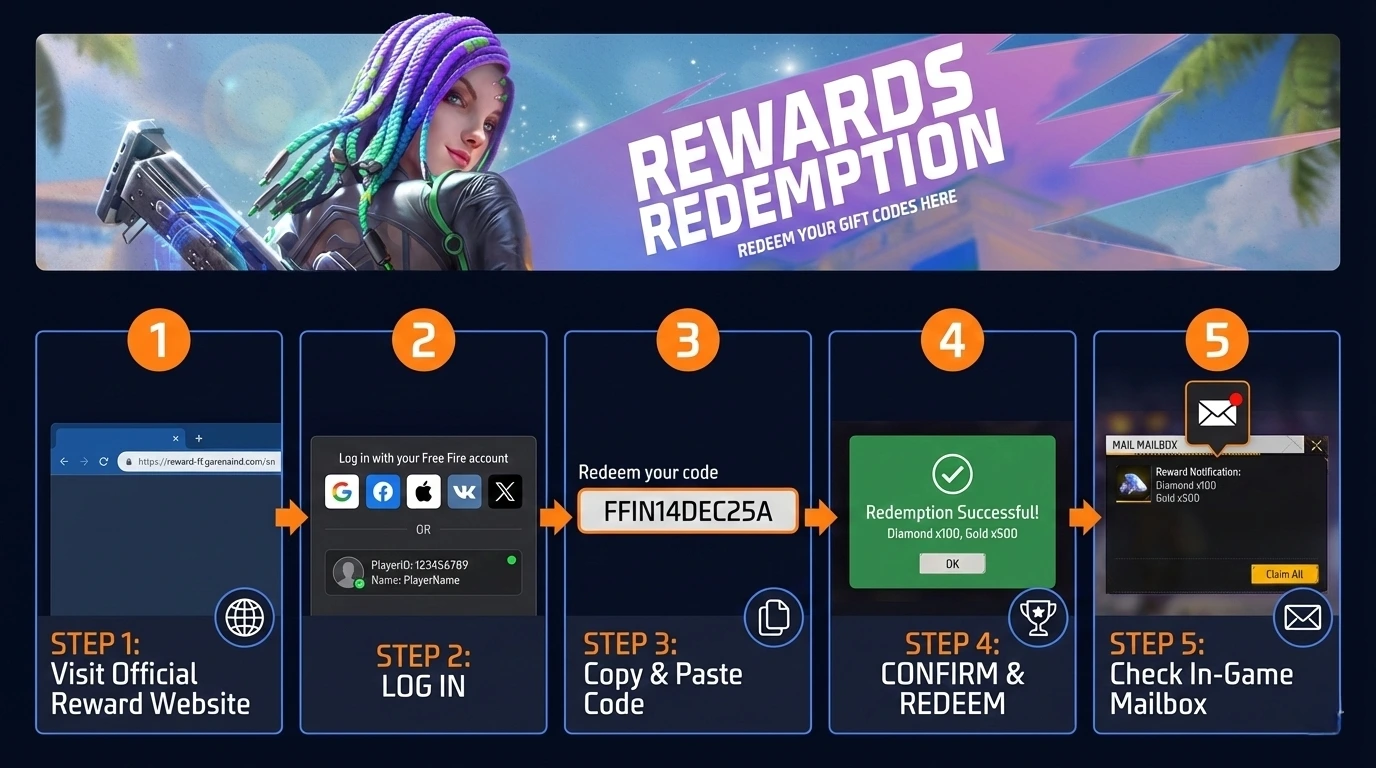
The official redeem portal is reward.ff.garena.com. Log in using the same Google or Facebook account linked to your Free Fire MAX profile. Paste the code, click Confirm, then collect the reward from your in-game mailbox within a few minutes.
| Error on Redeem Site | What It Means | What to Do |
|---|---|---|
| Invalid or expired code | Code window has ended or there is a typo | Copy-paste from the official source only. Check for look-alike characters (O vs 0, I vs 1). |
| Cannot use in your region | Code is locked to a different server | Only use codes posted by the Free Fire India official accounts for the India server. |
| Redemption limit reached | The 5,000-player cap has been hit | Turn on notifications for official channels. Popular codes fill up within minutes of being posted. |
| Guest account cannot redeem | Account is not linked to a login provider | Go to Free Fire MAX settings and bind your account to Google or Facebook, then try again. |
Avoid Fake Free Fire MAX Sites, Mod APKs and Phishing Scams
Scam sites targeting Free Fire MAX players are a serious and growing problem in India. They impersonate official Garena pages using typo domains and promise things that are technically impossible: free diamonds, unlimited redeem codes, and no-recoil hacks.
Any site using: grena free fire max, gerena free fire max, garina free fire, greana free fire, or any phrase like “diamond generator” or “hack tool” is a phishing or malware site. Close the tab and do not enter any account details.
- Only download Free Fire MAX from Google Play or the App Store. There is no legitimate reason to install it from any other source.
- Never enter your Google or Facebook password, OTP, UPI ID, or bank card details on any website that is not clearly on the garena.com domain.
- Avoid GFX tool apps that request Accessibility permissions. That level of access is not required for graphics tools and is a red flag for credential theft.
- Do not install any app claiming to give “no recoil” via a third-party overlay. These are either bannable cheats or malware disguised as tools.
- Enable two-step verification on your Google account. This prevents account takeover even if your password is compromised.
How to Improve Faster in Free Fire MAX (Practical Habits)
Settings only get you so far. Most Indian players plateau at Gold or Platinum rank because of decision-making habits, not settings. These are the five habits that have the biggest impact on improving faster in Free Fire MAX.
- Warm up in Training Room for 5 minutes before ranked matches. Aim feels completely different when your hands are cold and your thumbs are not warmed up. Five minutes of spraying and tracking in the Training Room eliminates this entirely.
- Pick one consistent landing spot and learn it deeply. Random landing teaches you nothing. Landing in the same area for 20 to 30 matches teaches you loot spawns, rotation paths, and which teams to avoid. That knowledge compounds into wins.
- Only take fights on your terms. The biggest mistake in ranked is chasing a knocked player into an open field with their full squad waiting. Learn to read when a fight is favourable before starting it.
- Use audio actively, not passively. Footsteps, door sounds, reload cues, and grenade pins all carry critical information. Playing with headphones at moderate volume gives you information no settings preset can replace.
- Watch FFMIC 2026 matches for positioning. You do not need to copy pro strategies exactly. Watching how top India server teams move and position in the final zone will immediately improve your game sense more than any YouTube tips video.
Free Fire MAX FAQs (India 2026)
Is Free Fire MAX available in India in 2026?
Yes. Free Fire MAX is available on both Google Play and the App Store for Indian players. It is the main way Indian players access the Free Fire ecosystem following the availability restrictions on the original app.
What is the Free Fire MAX OB53 update release date in India?
The OB53 Advance Server runs from 20 March to 2 April 2026. The full global OB53 update is expected in the first week of April 2026. Maintenance on patch day runs from 9:30 AM to 5:00 PM IST. Free up 2.5 GB of storage before that window.
What is Firelink in Free Fire MAX?
Firelink is the account sync system that links your Free Fire account to Free Fire MAX using the same Google or Facebook login. All your progress, rank, skins, characters, and diamonds are shared between both apps automatically. You do not need to create a new account for Free Fire MAX.
What are the best Free Fire MAX settings for a Redmi or Realme phone?
Use Smooth graphics, High FPS, Shadows OFF, Effects Low, and Anti-Aliasing OFF. Close all background apps before launching. Do not play while charging. Budget Helio chipsets throttle performance when they overheat, which is the main cause of mid-match FPS drops on these devices.
Why is the OB53 update not showing in the Play Store?
Updates roll out in waves by device and region. Restart your phone, open Play Store, and search Free Fire MAX directly instead of waiting for the notification. Check again after 2 to 3 hours if it still does not appear. Also confirm you have enough free storage, since low storage can prevent updates from showing.
How do I fix high ping on Jio or Airtel?
Turn off any active VPN. Switch to the 5GHz band on your Wi-Fi router if you are on Airtel broadband. Avoid gaming during peak hours between 8 PM and 11 PM IST when network congestion is highest. On Jio, the 5G SA band gives noticeably better in-game ping than 4G LTE for the India server.
Can I participate in the OB53 Advance Server?
Yes. Register at ff-advance.ff.garena.com using your linked Google or Facebook account. After registering, you receive an activation code for the Advance Server client. Codes are limited so register as soon as possible. Advance Server progress does not carry to your main account.
Is the Free Fire x Gintama collaboration confirmed for OB53?
The Gintama collaboration is strongly indicated by data mining and leaks but has not been officially confirmed by Garena as of the date of this article. The new Tactician character and Eclipse Evo Bundle are also sourced from leaks. Official confirmation is expected closer to the OB53 launch in early April 2026.
Official References and Safe Links
- Free Fire MAX on Google Play (Android)
- Free Fire MAX on App Store (iPhone)
- Garena Official Rewards Redemption Portal
- Free Fire OB53 Advance Server Registration
- Free Fire India Official Instagram
Related guides